Simple Alarm Clock
- 4.5
- Rating
- 50.00M
- Installs
- Free
- Price
 Analysis by App-foxy
I have always thought an alarm clock should disappear into the background until the exact moment I need it. That is the appeal of Simple Alarm Clock: it focuses on the one job most people expect from a productivity app, waking them up without turning the process into a project. After using it as a daily alarm, I found that its strongest quality is not a long list of extras, but the way quickly I could create, check, and adjust alarms.
Developed by Moula Software, this free Android app sits in a practical middle ground between the alarm built into a phone and feature-heavy sleep apps. Its store summary describes it as simple, loud, fast, and easy, and that gives a fair impression of the experience. It is aimed at people who want a dedicated alarm interface rather than a broader sleep tracker, habit coach, or calendar tool.
The app has been available since December 3, 2011, and its current version is 8.6.9. That long presence helps explain why it feels like a mature utility instead of a novelty. It has reached over 50 million installs, with a 4.5 average from around 553,000 ratings and roughly 11,000 written reviews. Those figures do not replace personal testing, but they do suggest that the straightforward approach has worked for a large audience.
You May Also Like

 Blood Strike: 2.5 Anniversary
Blood Strike’s Loadouts Turn Every Drop Into a Tactical Gamble
A close look at Blood Strike’s custom loadouts: how fast access to signature weapons reshapes its battle royale rhythm, rewards preparation, and narrows the gap between fights.

 Pandora - Music & Podcasts
Pandora’s Music Is Easy to Start, but Harder to Recover
Pandora’s strength is its low-effort path from a seed to a station. Its weak spot is how much confidence it asks you to place in connection, setup, and quiet recovery.

 8 Ball Pool
 Is Built on Rivalries, Rematches, and Routine
A close look at the rivalries, rematches, shared routines, and unanswered safety questions that turn a quick pool match into a persistent mobile community.

 Samsung Music
’s Quiet Strength Is Playing What You Already Own
Its reach comes less from spectacle than from dependable access to a personal library. That simplicity is both the app’s strongest retention engine and its ceiling.

 AccuWeather: Weather Radar
AccuWeather Review: A Quick, Clear Forecast for Everyday Decisions
For everyday plans, the best forecast is the one you can understand quickly. AccuWeather makes rain timing, radar, and local conditions easy to act on, with a few trade-offs.

 Hill Climb Racing
Why Hill Climb Racing Still Turns Crashes Into One More Run
A tiny car, a bumpy hill and one more upgrade: Hill Climb Racing keeps resurfacing because its simple chaos makes every near-miss feel personal.
More From Our News Desk



Building a dependable morning routine
I find a dependable morning routine starts before bedtime: I decide whether tomorrow is ordinary or an exception, then choose the alarm pattern to match. That small distinction keeps a temporary wake-up from quietly becoming part of the week. Next, I look at how a few deliberate settings and checks can make the routine easier to trust.
The baseline workflow is refreshingly direct
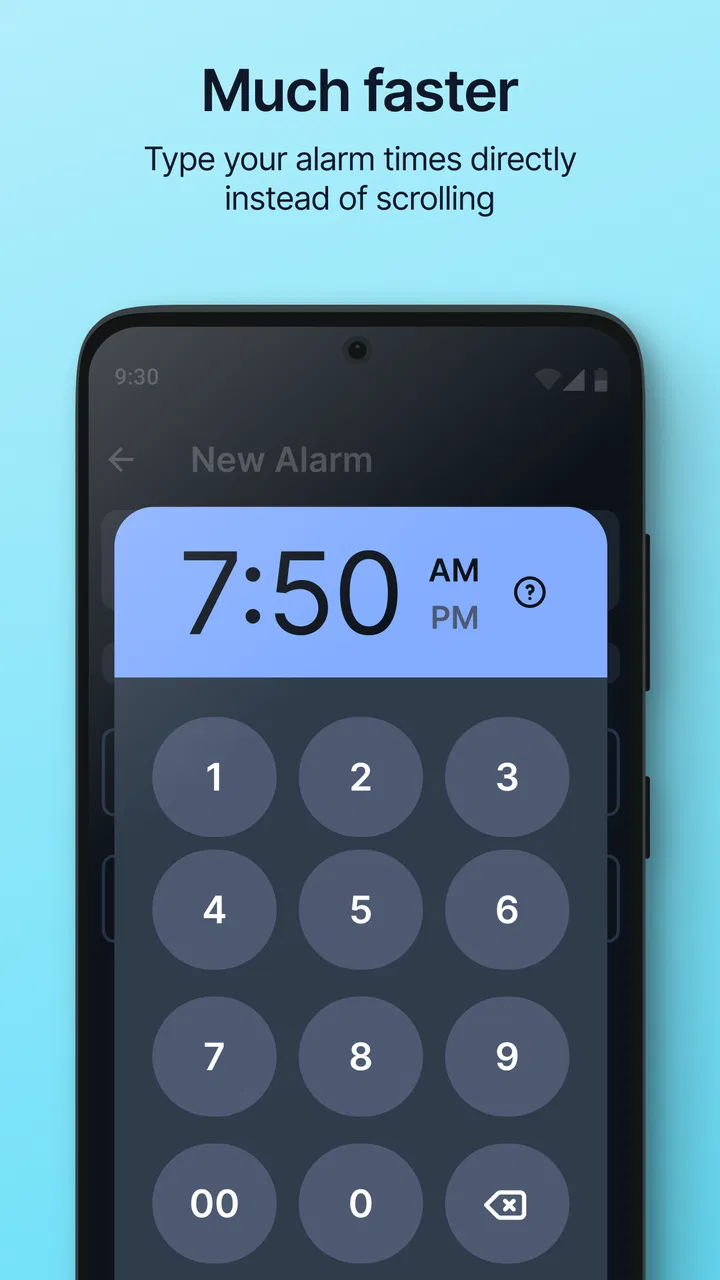
My normal routine with Simple Alarm Clock is uncomplicated. I open the app, create an alarm for the required time, choose the repeat pattern when needed, and check the result before leaving the screen. That last check matters more than it sounds: a readable alarm list makes it easier to notice whether I am setting a one-off wake-up or something intended for several mornings.
This is where the app differs from many modern sleep products. It does not make me begin with a sleep profile, bedtime questionnaire, or a promise to analyze my night. I can treat it as a small utility. If I need to wake early for an appointment, I set the alarm. If I am returning to a weekday schedule, I configure the repeating days and leave it alone.
A realistic example is a changing work week. On Sunday evening, I might set a repeating alarm for the mornings I commute, then add a separate one-time alarm for an unusually early appointment. The useful habit is to review the list after creating both. The repeating alarm handles the routine, while the temporary alarm covers the exception. Keeping those roles separate reduces the chance of accidentally changing the regular schedule just to accommodate one morning.
I also like using the app as a visible commitment rather than relying on memory. When the alarm is shown in the list, I can confirm the time and repeat behavior at a glance. That makes it suitable for students, shift workers, parents, travelers, and anyone whose wake-up time changes from one day to the next.
What it does well for everyday use
The main strength is low friction. A simple alarm is easier to trust when its controls are not buried under sleep reports, motivational messages, or unrelated tools. Simple Alarm Clock keeps the focus on scheduling and alerting, which is exactly what I want when I am tired or preparing for the next day.
Its free price also makes it easy to try without committing to a subscription. There are in-app purchases ranging from $0.99 to $2.99 per item, so some optional elements may involve a small payment, but the app itself is listed as free. For a basic alarm routine, that makes the starting point accessible.
The Everyone content rating is another reason it can fit a shared household device or a family member who needs a clear wake-up tool. I would still configure it personally rather than assuming every setting is ideal out of the box, especially if the alarm is important for work or travel.
Settings that deserve a deliberate check
The first setting I would inspect is the alarm sound and its loudness. A tone that seems acceptable during the day may be too gentle when I am deeply asleep. Conversely, an aggressive sound can make waking unpleasant and encourage me to disable the alarm altogether. I prefer testing the selected sound while awake, then choosing the loudest option I can tolerate consistently rather than simply picking the most startling one.
Repeat behavior deserves equal attention. A repeating alarm is convenient, but it can become a problem when a schedule changes. Before a holiday, a day off, or a late night, I make a point of checking whether the regular alarm should remain active. A one-time alarm is safer for an unusual morning because it does not quietly alter the rest of the week.
Snooze behavior is worth treating as a habit decision, not just a convenience. If I use snooze repeatedly, I am not really gaining rest; I am creating several small interruptions. I find the app works better when I decide in advance whether snooze is part of my routine. For important mornings, placing the phone beyond easy reach can be more effective than adding more alarm attempts.
Notification and system behavior should also be considered. Android versions and phone manufacturers can manage background apps differently, so I would check the device’s notification, sound, and battery-related controls if an alarm is essential. I am not saying the app is unreliable; rather, an alarm is one of those tools where the phone’s own settings matter as much as the app screen. After installing or updating it, I would run a short daytime test instead of waiting for an important morning to discover a configuration issue.
Small routines that make the app more reliable
Experienced use is less about discovering secret functions and more about combining the available controls with repeatable behavior. I use a naming habit for alarms when the app allows a label: a purpose such as “work,” “airport,” or “appointment” is more useful than leaving several identical times unexplained. If the interface supports labels in the installed configuration, they make the list easier to audit; if not, the same principle still applies through a quick visual review of times and repeat patterns.
Another useful pattern is a two-stage check. First, I create or edit the alarm. Second, I close and reopen the list, or otherwise review the saved state before putting the phone down. This is not glamorous, but it catches the common human mistake of changing a time without noticing that the wrong days are selected.
I also avoid stacking alarms too closely together unless there is a clear reason. Several alarms can feel reassuring, but they may turn the morning into a sequence of interruptions and make it harder to know which one is the real wake-up time. One well-tested alarm, possibly supported by a second alarm with a distinct purpose, is usually cleaner.
Faster patterns for busy mornings
For a regular schedule, the fastest approach is to create the repeating alarm once and then leave it untouched. I do not rebuild it every evening. Repeated editing creates opportunities for mistakes, especially when I am tired. Instead, I reserve daily changes for genuine exceptions and review the active alarms whenever my schedule changes.
For irregular work, I treat the app as a short-term planner. I set only the alarms I need for the next several days, then remove or disable temporary entries after the event. That keeps the list understandable. A crowded alarm screen is not a sign of better preparation; it can make an outdated alarm easier to overlook.
When I need to wake at a different time tomorrow, I prefer editing the correct existing alarm rather than creating another alarm at nearly the same time. The choice depends on whether the schedule should continue afterward. If the change is temporary, a separate one-time alarm is safer. If the whole routine has changed, editing the repeating schedule is more efficient. This distinction is one of the most useful decisions the app supports conceptually, even though it requires the user to stay organized.
Shortcuts can also mean using the phone’s normal habits around the app: keeping the device in a consistent place, checking the alarm before bedtime, and avoiding silent or disruptive sound settings. The application cannot compensate for a phone that is muted, placed under a pillow, or left with confusing system audio controls. The best results come from treating the alarm and the surrounding routine as one system.
Where it compares well with usual alternatives
Compared with the default clock app, Simple Alarm Clock is attractive if I want a more focused alarm experience. The difference is not necessarily that it can replace every clock feature; its value is that the alarm task feels like the center of the product. Someone already satisfied with the phone’s built-in clock may not gain enough to justify switching.
Compared with sleep-tracking apps, it is much less ambitious. It does not appeal to me when I want bedtime analysis, sleep-stage estimates, smart wake windows, or a broader wellness dashboard. Those apps may be better for users who enjoy reviewing patterns and changing their routine based on recorded information. Simple Alarm Clock is better when I want fewer decisions and a clear wake-up action.
Compared with alarm apps built around puzzles or forced challenges, this one is likely a better fit for people who dislike being made to solve something immediately after waking. That simplicity is a strength for a straightforward morning, but it can be a weakness for heavy sleepers who routinely dismiss alarms without becoming fully awake. If I needed a wake-up system that demanded physical movement or mental tasks, I would look elsewhere.
Advanced limits and practical trade-offs
The app’s narrow purpose is also its main limitation. It is not a complete schedule manager, and I would not use it to coordinate a complicated series of reminders, medication timing, meetings, and travel plans. A calendar or task app is better when the event itself matters as much as the time. An alarm tells me when to act; it does not give me the broader context of why the action is important.
It is also not the right choice for users who want detailed sleep insight. There is a meaningful difference between waking me at a chosen time and helping me understand whether I slept well. Simple Alarm Clock handles the first problem. It should not be judged as though it were designed for the second.
Reliability still depends on responsible setup. I would not install it and immediately trust it for an exam, a flight, or the first day of a new job without testing the sound and checking the phone’s behavior. A backup alarm can be sensible for high-stakes mornings, particularly if the device battery, speaker, or system settings are uncertain.
Updates can also create a moment for rechecking. The current version is 8.6.9, and after any significant app or phone change, I would verify one alarm during the day. This takes little time and is a better habit than assuming every setting remained exactly as expected.
The in-app purchase range is modest, but it is still worth remembering that “free” does not necessarily mean every optional element is included without payment. I would begin with the basic workflow and only pay for something if it solves a problem I actually have. For a user who wants a completely minimal experience, even optional purchase prompts may feel like unnecessary interruption.
Who should use it, and who should skip it
I would recommend Simple Alarm Clock to someone who wants a dedicated, uncomplicated wake-up tool on Android. It suits people who need repeating weekday alarms, occasional one-time wake-ups, or a clearer alternative to a crowded clock application. It is especially sensible for users who prefer setting their schedule manually and do not want sleep data or a coaching layer.
I would be more cautious about recommending it to a very heavy sleeper who regularly sleeps through ordinary alarms. In that case, the important question is not only whether the app can schedule an alarm, but whether the person needs a more demanding wake-up method, a separate physical alarm clock, or a second device. Likewise, users whose priority is sleep analysis, smart scheduling, or integration with a detailed wellness routine should choose a more specialized product.
It may also be a poor fit for someone who wants alarms to be managed automatically from a calendar or changing work roster. Manual control is useful when I want predictability, but it becomes work when the schedule changes constantly. A calendar-centered workflow can be more appropriate in that situation.
My final routine with Simple Alarm Clock
After using it, I see the app as a dependable basic tool rather than an all-purpose productivity platform. I get the most from it by keeping the alarm list tidy, separating repeating schedules from one-time exceptions, testing important sounds in advance, and checking the phone’s own audio and battery behavior. Those habits matter more than filling the app with multiple alarms.
What I appreciate most is the lack of pressure to turn waking up into a complicated system. The app is free to start, supports a broad Everyone audience, and has the kind of established presence that makes it easy to understand why so many people continue using it. Moula Software has kept the central idea clear: set a time, choose the relevant behavior, and let the alarm do its job.
My recommendation is simple: choose it when a focused alarm is exactly what you need, not when you are searching for a sleep laboratory, calendar replacement, or challenge-based wake-up coach. For ordinary mornings, changing weekly schedules, and users who value speed over decoration, Simple Alarm Clock is an easy app to live with. Its limits are real, but they are mostly the honest limits of a product that refuses to become something more complicated than an alarm clock.
FAQs for Simple Alarm Clock
01What is Simple Alarm Clock and what can I use it for?
Simple Alarm Clock is a straightforward alarm and time-management app designed for users who want reliable alarms without an overloaded interface. After reviewing its main functions, the app is best suited for setting wake-up alarms, reminders, and recurring schedules. Its simple layout makes it easy to check active alarms, adjust times, and manage daily routines, especially if you prefer practical tools over complicated customization.
02Does Simple Alarm Clock work when my phone is on silent or Do Not Disturb mode?
Alarm behavior can depend on your phone’s operating system, sound settings, and battery restrictions. In general, users should verify that alarm volume is turned up and that the app is allowed to play sounds during Do Not Disturb mode. On some Android and iOS devices, notification permissions, focus settings, or aggressive battery optimization may affect alerts, so checking these options before relying on an alarm is recommended.
03Can I create repeating alarms and multiple alarm schedules?
Yes, Simple Alarm Clock is intended to support everyday scheduling through multiple alarms and repeat options, making it useful for workdays, school, medication reminders, exercise, or regular appointments. Before downloading, keep in mind that the exact scheduling tools may vary by platform and app version. It is worth reviewing each alarm’s repeat days, label, sound, and enabled status to avoid accidental missed reminders.
04Does Simple Alarm Clock require an internet connection or collect personal data?
A basic alarm clock normally performs its core functions directly on the device, so an internet connection should not be necessary for alarms to ring. However, privacy practices can differ between Android and iOS versions, particularly if the app includes advertising, analytics, or optional online features. We recommend checking the store listing and privacy policy for current information about permissions, data collection, and third-party sharing.
05What should I check if an alarm does not ring at the expected time?
If an alarm fails, first confirm that it is enabled and that the selected time, repeat days, and AM or PM setting are correct. Also check the device’s alarm or notification volume, Do Not Disturb rules, silent mode, time-zone settings, and battery-saver restrictions. Keeping the app updated and avoiding forced closure may help. For important events, it is sensible to use a secondary alarm until the app works reliably on your device.
Pros
- Clean
- uncluttered interface is easy to understand.
- Supports multiple alarms for different schedules.
- Quick alarm setup with minimal navigation.
- Large clock display is easy to read at a glance.
- Lightweight app uses little storage and battery.
Cons
- May lack advanced smart alarm or sleep-tracking features.
- Customization options can feel limited for power users.
- Some devices may restrict alarms during battery saving.
- No built-in weather or calendar information.
- Alarm behavior may vary across Android and iOS versions.

Simple Alarm Clock
Gallery